


SoFi: Bank, Investing & Crypto
3.821.32K Reviews
App Specs
- Version
- 3.110.1
- Updated On
- License
- Free
- Downloads
- 5,000,000+
- Developer
- Social Finance, LLC
- Categories
- Finance
- Platform
- Android, iOS
Screenshots



 Analysis by AppCompare
I like the idea of keeping everyday banking and investing close together, but I don’t think one app automatically suits every financial job. SoFi: Bank, Invest & Crypto is most appealing if you want a single place to check several parts of your money life rather than jump between specialist apps. Its broad mix is convenient, though it also asks you to accept a more general-purpose experience instead of choosing a separate tool for each task.
What it feels like to use
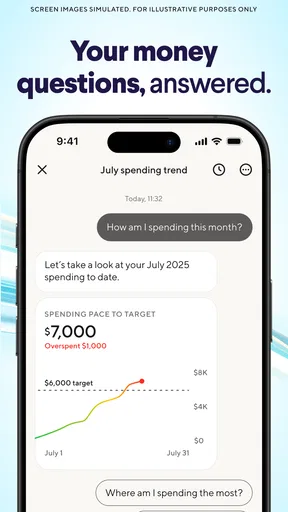
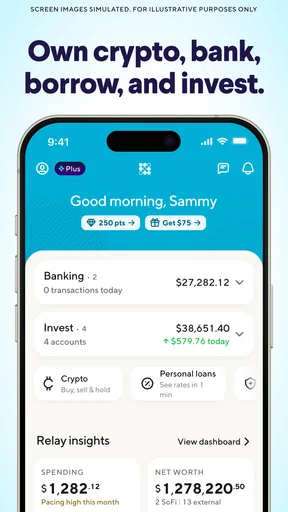
Right off the bat, the user interface of SoFi: Bank, Invest & Crypto is sleek and intuitive. It’s like having a personal finance assistant right in my pocket. The design is clean, and navigating through the app is a breeze. Whether you're looking to check your bank balance, manage your investments, or dabble in crypto, everything is just a tap away. It’s all about keeping things simple and efficient.
That convenience matters most when I’m doing quick checks, not when I’m making a serious decision. A glance at a balance or an investment position is easier when the relevant areas sit under one roof. Still, I’d treat the app as a dashboard and access point, not as a substitute for a thoughtful budget or an investment plan. Putting accounts and markets close together can make money feel easier to manage, but it doesn’t remove the need to decide what each dollar is meant to do.
Banking Features
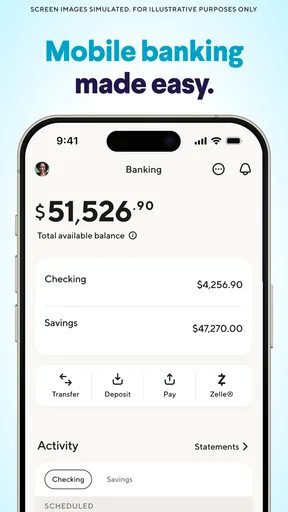
One thing I absolutely love about SoFi is its banking features. The app offers a fee-free bank account which includes free ATM access and no account fees. It’s refreshing to finally not have to worry about those pesky charges eating away at my savings. Plus, the instant transfers between accounts are a lifesaver. I can easily move money around without any hassle. It’s like having a bank that’s open 24/7.
A practical way to use that setup is to give the account a clear role before moving your routine finances into it. For example, I’d first use it for a recurring bill and a small everyday purchase, then check that the activity is easy to follow in the app. That simple trial helps reveal whether the account’s layout works for your habits before it becomes the place you rely on for every payment. If you already have a bank account that handles cash deposits, shared household needs, or other routines particularly well, there’s no reason to switch everything at once.
For an ordinary payday routine, I’d check incoming money, set aside what I need for upcoming expenses, and only then decide what is genuinely available to save or invest. Seeing banking and investing in one app may make that sequence easier to keep in mind, but I would still avoid treating an investment balance as spending money. Markets move, and an investment account serves a different purpose from the cash you need for rent, groceries, or an unexpected expense.
Investing Made Easy
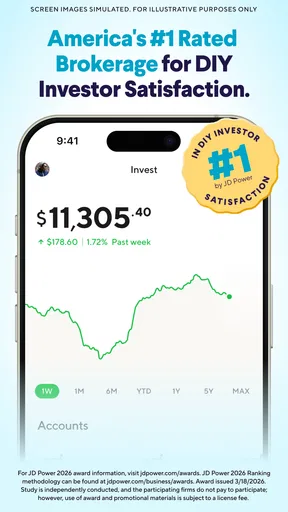
For those of you keen on investing, SoFi’s got your back. The app provides a straightforward platform to buy and sell stocks. What’s cool is that it offers fractional shares, which means you can invest in big companies without needing a ton of cash. It’s perfect for dipping your toes into the stock market without feeling overwhelmed. Plus, the app gives you access to a variety of ETFs and automated investment portfolios, which makes diversifying your investments super easy.
Worth Reading Before You Choose

EA SPORTS FC Mobile 26 Is a Bigger Football Game, but It Takes Time

Flipboard Shows What News Apps Must Do Beyond the Feed

Switching to Android Auto Means Rethinking Your Driving Routine

Google Calendar Makes a Crowded Week Easier to Manage

Ludo King Makes the Most of the Minutes Between Plans

Baby Panda World Brings Quick Play to Modern Phones, but Its Game Library Feels Busy
Fractional shares can make it easier to begin with a chosen amount instead of feeling that a whole share is the minimum sensible step. I’d use that flexibility to build a deliberate routine, such as setting aside a manageable amount after essential bills, rather than buying something just because it is easy to tap. ETFs and automated portfolios can also be useful starting points for someone who wants broader exposure without selecting every holding individually. They do not make investing risk-free, though, and an automated approach still needs to fit your goals and tolerance for losses.
The trade-off is that a simple buying flow can make frequent decisions feel harmless. Before placing an order, I’d pause to ask whether I understand what I’m buying, how it fits with the rest of my portfolio, and whether I can leave the money invested through a downturn. Someone who wants detailed research tools, advanced order controls, or a specialist investing interface may be better served by a dedicated brokerage app. SoFi’s appeal is the connection to everyday finances, not necessarily depth for every kind of investor.
Crypto for the Brave
If you're feeling adventurous, SoFi also lets you dive into the world of cryptocurrency. With options like Bitcoin and Ethereum, it’s a great way to explore this exciting market. The app keeps things straightforward, ensuring even newbies can navigate the crypto waters without feeling lost. It’s a neat feature for anyone curious about digital currency.
I’d treat crypto as the most optional part of the mix, not as a natural next step after opening a bank account or investing in stocks. If you’re curious, decide in advance how much risk you can genuinely accept and keep that amount separate from money earmarked for bills or near-term plans. The fact that buying is accessible does not make a volatile asset appropriate for everyone. If you want specialist crypto tools or a wider set of digital assets, a dedicated service may be a better fit; if you have no interest in crypto, you can simply ignore that part of the app.
Additional Perks
One of the delightful surprises with SoFi is the community aspect. The app offers a wealth of educational resources and even has a community where you can exchange tips and financial advice. From webinars to articles, there’s plenty to keep you informed and financially savvy.
I’d use educational material to learn terms and compare approaches, but I wouldn’t treat community comments as personal financial guidance. People can have different timelines, incomes, and comfort with risk, so a strategy that suits one person may be a poor match for another. A useful habit is to take a question from an article or discussion and check how it applies to your own plan before acting. That keeps the learning element helpful without turning a confident post into a reason to make a rushed trade.
Oh, and did I mention the rewards? SoFi offers a neat rewards program where you can earn points for actions like spending or investing, which you can then redeem for cash. It’s a nice little bonus for staying financially active.
I’d think of points as a small extra, not a reason to spend more or invest in a way I otherwise wouldn’t. If a reward encourages a transaction you already intended to make, it can feel like a pleasant bonus; if it changes the decision, the underlying cost or risk matters more than the points. That distinction is especially useful in a finance app, where rewards and investment activity sit close to everyday money management.
Who will get the most from it
This is strongest for someone who is curious about investing, wants routine banking within the same app, and values a straightforward place to keep an eye on both. A newcomer may appreciate being able to explore stocks, ETFs, automated portfolios, and crypto without first learning several separate interfaces. A more experienced user might prefer the convenience for routine checks while keeping a specialist brokerage or crypto service for tasks that need more control.
I would skip it as an all-in-one solution if you mainly need a bank built around a particular local service, a highly specialized investing platform, or an app devoted entirely to crypto. Likewise, if having market prices beside your everyday cash would tempt you to check or trade too often, separating banking from investing could be a healthier choice. The best setup is not the one with the most features; it’s the one that makes your own money habits clearer.
How it compares with separate finance apps
Compared with using a conventional banking app alongside a brokerage and a crypto platform, SoFi’s main advantage is reducing the number of places you need to open for a quick overview. That can make small routines feel less scattered. The compromise is that a combined app may not be the strongest choice for every individual activity. A dedicated bank can be preferable when its account tools match your day-to-day needs, while a specialist investment service may suit someone who wants a deeper research workflow.
Before choosing, I’d compare the actual tasks I perform rather than the size of a feature list: how I move money, how I review investments, and whether I need to keep crypto at all. It’s also sensible to check the current terms and account details in the app before relying on any particular benefit. Finance products can have conditions, and a feature that sounds useful in general may not be the deciding factor for your personal situation.
A few practical checks before committing
If you’re wondering whether you need to use every part of the app, I wouldn’t assume so. You can approach it according to your priorities: begin with banking, explore investing only when you have a clear purpose, and leave crypto alone unless it genuinely interests you. That staged approach makes it easier to understand the interface and your own preferences without feeling that you should adopt every option just because it appears alongside the others.
It’s also worth asking whether a unified view will help you stay organized or make you check your finances more often than you need to. I find the former useful when I’m reviewing a planned transaction or checking whether money is set aside; I’d be more cautious if I were opening the app repeatedly to react to short-term market movement. A steady review routine is generally more useful than constant monitoring, especially for long-term investing.
SoFi is a finance app from Social Finance, LLC. It is free to download, rated for Everyone, and has an average rating of 3.9 from around 50,000 ratings, with over 5 million installs. Its release date was April 10, 2017, and version 3.75.4 requires iOS 8.0 or later. Those details give a sense of the app’s reach and compatibility, but I’d still judge it by whether its mix of services fits the way I handle money.
Final Thoughts
All in all, SoFi: Bank, Invest & Crypto is a powerhouse of an app. If you’re looking to streamline your financial life, it’s definitely worth downloading. It’s packed with features that cater to both beginners and seasoned financial enthusiasts. Whether you’re banking, investing, or exploring crypto, SoFi makes it all accessible and straightforward. Give it a try, and who knows, you might just find managing your finances a whole lot more fun!
My more measured verdict is that its breadth is the real reason to consider it: banking, investing, and crypto sit together, making everyday checks and occasional financial tasks feel connected. That same breadth is not a promise that it will replace every specialist service, and the approachable interface should not be mistaken for a reason to take more risk. I’d recommend trying it if you want a convenient starting point across several financial activities; I’d keep looking if one particular service matters far more to you than the convenience of having them together.
Pros
- User-friendly interface for easy navigation.
- Comprehensive investment options available.
- Low-fee structure for transactions.
- Integrated budgeting tools included.
- Quick and responsive customer support.
Cons
- Limited international transaction support.
- Crypto features can be complex for beginners.
- Some features are US-only.
- Occasional app glitches reported.
- No dedicated savings account options.
FAQs for SoFi: Bank, Investing & Crypto
What is SoFi and what services does it offer?
SoFi is a comprehensive financial app that provides a range of services including banking, investing, and cryptocurrency trading. Users can manage their finances, make investments in stocks, ETFs, and cryptocurrencies, as well as access personal loans and credit score monitoring. It’s designed to be a one-stop financial solution for its users.
How secure is the SoFi app for handling personal and financial information?
SoFi prioritizes user security by employing bank-grade encryption and robust security protocols to protect personal and financial data. The app also offers two-factor authentication and continuous monitoring for suspicious activity. Users can feel confident that their sensitive information is safeguarded against unauthorized access.
Are there any fees associated with using SoFi's banking and investment services?
SoFi offers many of its banking services without fees, such as no account fees and no overdraft fees. When it comes to investing, there are no commissions on trades for stocks and ETFs. However, users should review specific services for any applicable fees, especially concerning cryptocurrency trading.
Is SoFi available for both Android and iOS devices, and how does its usability compare across platforms?
Yes, SoFi is available on both Android and iOS platforms. The app is designed with a user-friendly interface that provides a seamless experience across devices. It offers consistent functionality and accessibility, ensuring users can easily manage their finances regardless of their preferred platform.
What are the customer support options available if I encounter issues with the SoFi app?
SoFi provides multiple customer support options, including in-app chat, email support, and a phone helpline. Users can access the extensive FAQ section and community forums for additional assistance. The support team is known for being responsive and helpful in resolving user issues efficiently.


